 By
By 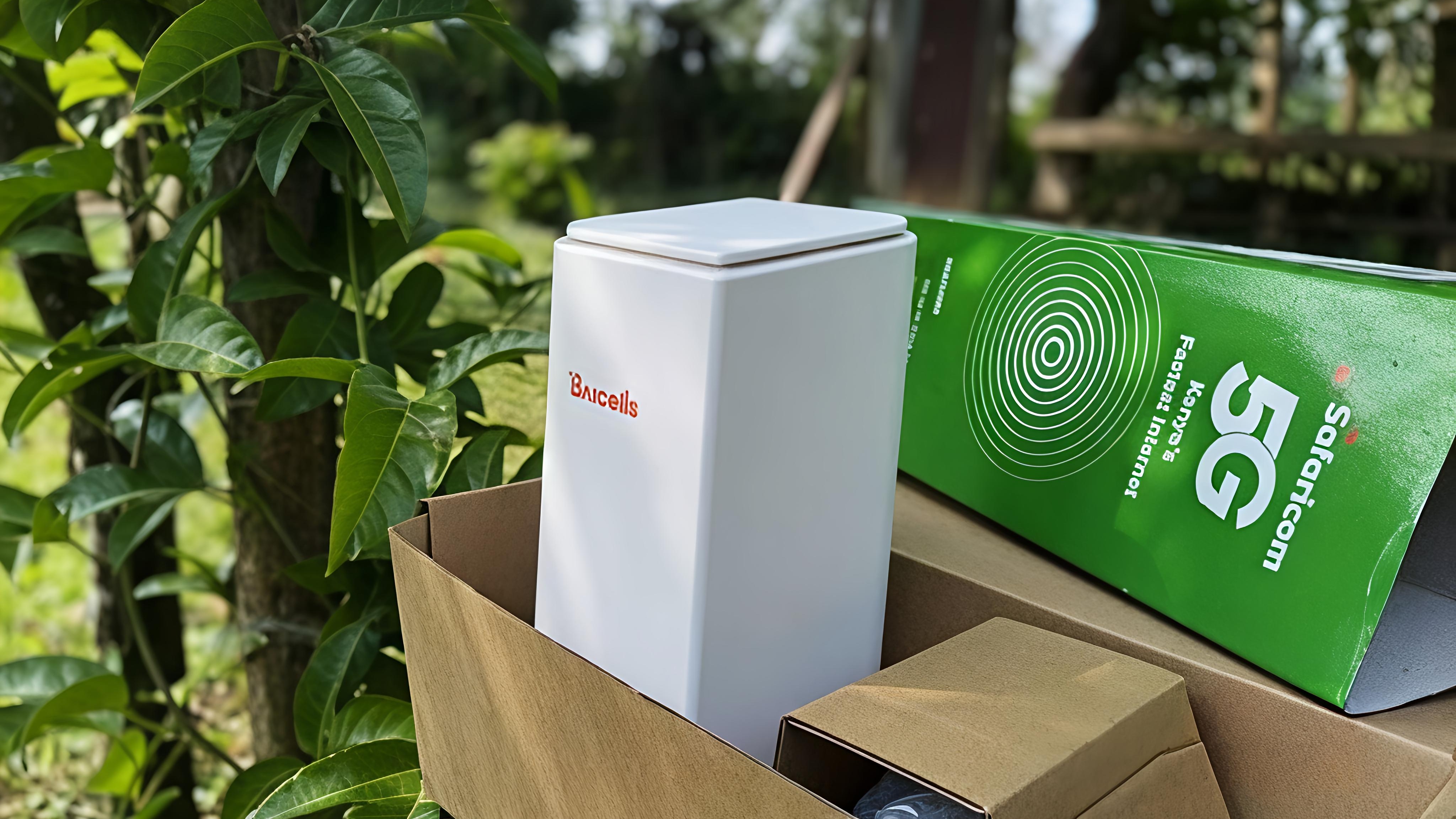
Introduction: How I Ended Up With Two Different 5G Routers
Here's the thing - when Safaricom launched their 5G home WiFi router, my mom was one of the first people to grab it. Safaricom reps literally walked into her shop and she bought it on the spot. That was the Baicells router, and spoiler alert: it's been working flawlessly for 7 months now.
Fast forward 3 months later when I decided to get my own. I walked into every Safaricom shop I could find, checked Masoko, asked around - and the Baicells router had completely vanished. When I contacted Safaricom customer care, they gave me this explanation: "We moved to Huawei because Baicells occasionally dropped network and Huawei is better in handling connectivity."
I'm calling BS on that. My mom has been using the Baicells router for 7 months without a single network issue. I think the real reason is Safaricom's long-standing partnership with Huawei. But anyway, I ended up buying the Huawei CPE router, and I've been using it for almost 5 months now.
This review covers both models because honestly, the differences matter.
What's In The Box?
Both routers come with minimal packaging:
The router itself
One RJ45 ethernet cable
Power cable with that annoying blue pin connector (more on this later)
A manual
That's it
No fancy accessories. Just plug and play... well, after the mandatory Safaricom registration.
Design & Build: Light, Portable, But One Missing Feature
Baicells Router
The Baicells model is surprisingly light and portable. The standout feature? It has a built-in battery that lasts 2-3 hours without power. This is a game-changer in Kenya where power outages are just part of life. My mom's shop has stayed connected through countless blackouts while everyone else is offline.
Huawei CPE Router
The Huawei model is even smaller and lighter than the Baicells. It's incredibly portable and fits easily in a backpack. But here's the catch - no built-in battery. When the power goes out, you're instantly disconnected.
This is my biggest gripe with the Huawei model. They clearly cut this feature to save costs or push their partnership, and it's frustrating because the Baicells proved it's possible.
The Charger Problem
Both routers use a proprietary blue pin charging port instead of USB-C. This is 2025 (almost 2026), and we're still dealing with proprietary chargers? Come on, Safaricom.
Want a backup power solution? You can't just buy a power bank. You'll need a mini UPS or a power station like Anker's, which will set you back thousands of shillings just to get that AC socket to plug the charger into. It's an unnecessary expense that wouldn't exist if they'd just used USB-C.
Indicator Lights
The router has 3 LED lights:
Power indicator
4G network indicator
5G network indicator
Simple and functional. You'll know exactly what network you're connected to at a glance.
Network Performance: The Real Test
Coverage Area
This is where the Safaricom 5G router really shines. This thing works almost anywhere. I'm not exaggerating. My friends and I have carried this router from house to house in Nairobi, and it connects everywhere.
I've even taken it to remote areas of Kajiado, and it works like a charm. The portability means you can literally fit it in your backpack, take it to a friend's place, plug it in, wait the usual 5 minutes for boot-up, and you're gaming on a PS5 with stable internet.
Speed Test Results
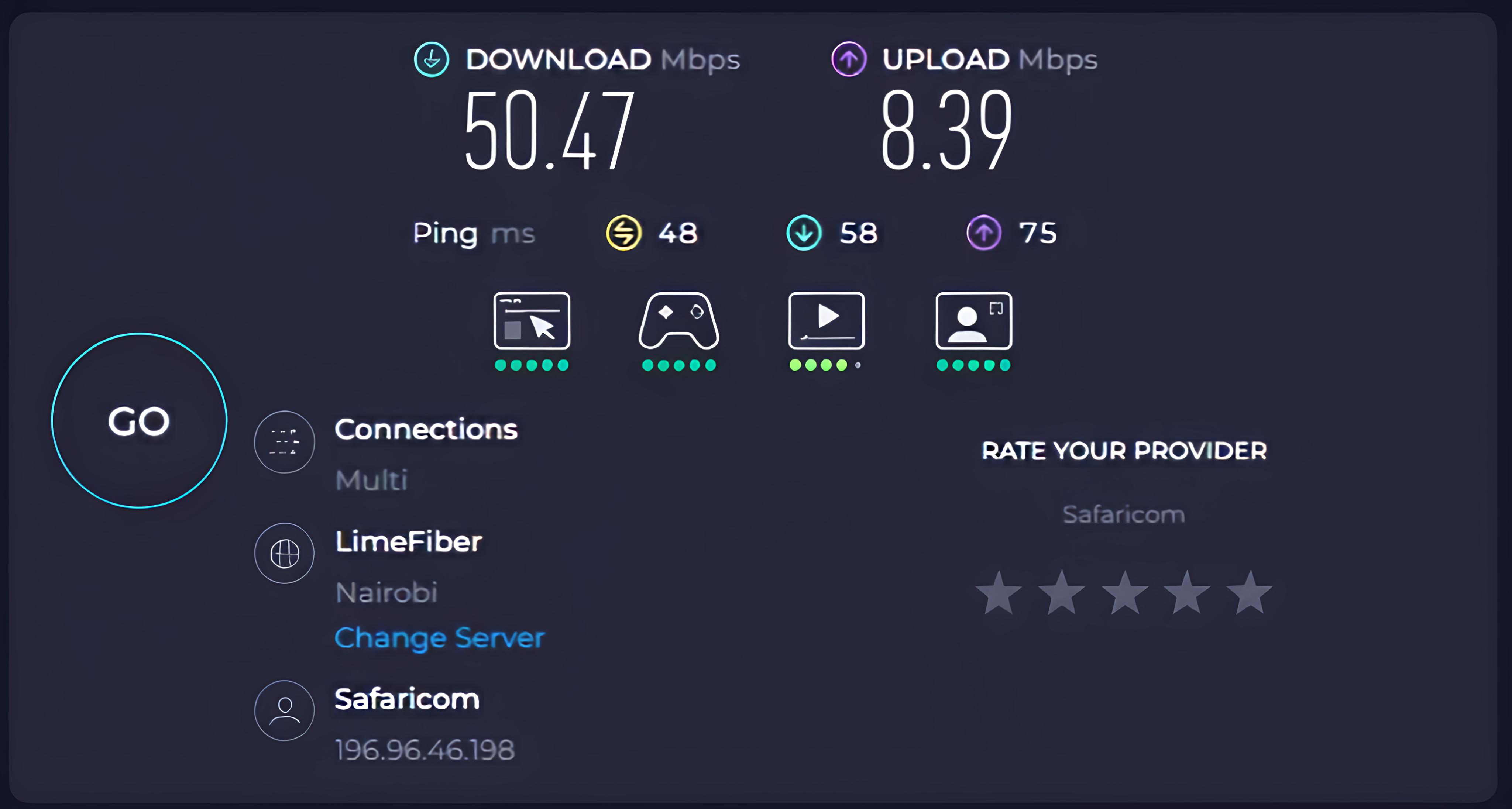
Safaricom advertises specific speeds for each package, but in real-world testing, you actually get slightly better:
15Mbps package: Ranges from 15-20Mbps on a single device
50Mbps package: Consistently delivers 50Mbps or slightly higher
The advertised speeds are actually conservative
However, there's a catch - the more devices connected and actively using the internet, the slower it becomes. This is expected with any router, but it's worth noting.
Ping & Gaming
The ping is actually impressive. Using Ookla speed tests, I consistently get under 30ms ping, especially in Nairobi. This makes the router viable for online gaming, video calls, and anything else that needs low latency.
Network Reliability
In 7 months with the Baicells and 5 months with the Huawei, network drops are almost non-existent. When you're connected, you stay connected. The network stability is genuinely impressive.
The Power Outage Problem: A Major Pain Point
Here's where things get frustrating. When there's a power blackout and the power returns, the router takes forever to come back online:
2 minutes before the router/WiFi shows up on your devices
Another 3 minutes before you can actually access the internet
You can connect immediately, but it'll show "No Internet Connection" for about 3 minutes
Total recovery time: Around 5 minutes
It feels like you're waiting for a Windows XP machine to boot up. This is by far the biggest challenge with these routers. The slow reboot time is annoying, especially if you're in the middle of something important.
This is where the Baicells' built-in battery becomes invaluable - my mom never experiences this issue because her router stays powered through short outages.
Data Packages & Pricing: The Value Proposition
Safaricom recently updated their packages, and there's been a significant improvement to the entry-level plan:
Package | Speed | Data Cap | Price |
|---|---|---|---|
Basic | 15Mbps | 450GB | KES 2,999 |
Standard | 50Mbps | 1.5TB | KES 4,000 |
Premium | 100Mbps | 2TB | KES 5,000 |
Ultra | 250Mbps | 4TB | KES 10,000 |
Initial cost: Router costs KES 3,000 + first month subscription = KES 6,000 minimum to get started.
Real-World Usage Experience
I live with 3 other guys, and we pay for the 50Mbps package at KES 4,000 (1.5TB cap). We rarely even hit 1TB in a month. But here's the interesting part - when we tried to save money by downgrading to the 15Mbps package (250GB at the old pricing), we finished the data in 2 weeks.
For a difference of just KES 1,000, you get a massive jump:
From 450GB to 1,500GB (over 3x the data)
From 15Mbps to 50Mbps (over 3x the speed)
The value proposition on the higher packages is genuinely excellent. The 50Mbps package is the sweet spot for most households.
The Hidden Grace Period
Here's a little hack: if you pay for your subscription at 5 AM, it expires 30 days later at midnight - not at 5 AM. Unlike normal data bundles that expire at the exact time, this one always expires at midnight. This means you can squeeze out an extra grace period of more than 12 hours depending on when you purchase. Not huge, but it's something.
About Those "Device Limits"
Some packages mention things like "up to 4 devices" or similar limits. Ignore this completely. The router can connect as many devices as you want. There's no actual device limit unless you set one yourself in the admin panel. The only thing that happens is the more devices actively using the internet, the slower it becomes for everyone. That's just basic network congestion, not an artificial limit.
Data Cap Reality Check
In the Safaricom app, under bundle balance, it will show "Unlimited" no matter what package you're using. Don't be fooled. There's an actual cap, and when you hit it, you're completely cut off.
For example, if you reach the 450GB mark on the basic plan, they'll completely cut you off. It'll show "No Internet." You won't even be able to send a WhatsApp text. You'll need to top up or wait for your next billing cycle.
Managing Your Router & Subscription
Subscriptions: The Safaricom App
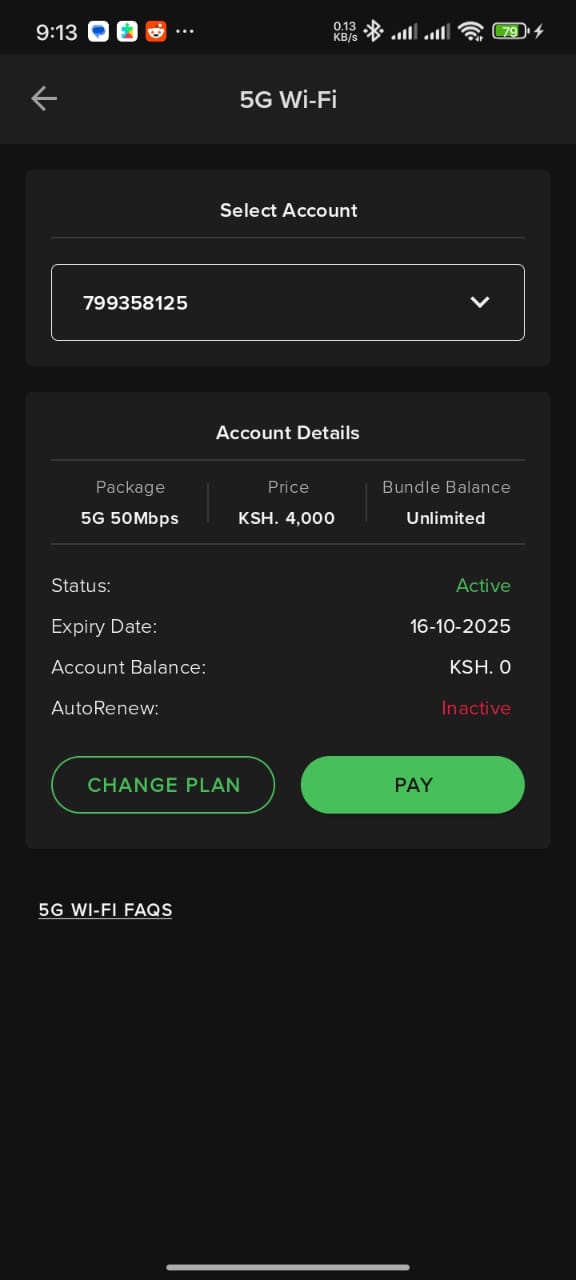
All subscription management happens through the Safaricom app. Here you can:
Change plans
Top up data
View your account
Check bundle balance
WiFi Settings: The Admin Panel
For everything else, you need to visit http://192.168.8.1/ while connected to the WiFi.
First-time login details are on a sticker at the bottom of the router. Once logged in, you can:
Change WiFi password and name
Set up usage limits
Configure guest WiFi (I've never used this, but it's there)
View detailed usage statistics
See all connected devices
Add devices to a blocklist
Choose between 5GHz and 2.4GHz bands, or run both
5GHz vs 2.4GHz: What's The Difference?
5GHz: Faster speeds but shorter range, doesn't pass through walls well
2.4GHz: Slower speeds but longer range, better wall penetration
I usually run both simultaneously and let devices choose the best connection.
The SMS Feature Nobody Asked For
There's a messaging section in the admin panel where you can view SMS messages. This line apparently acts like a real Safaricom number, so you'll see:
Safaricom telling you to activate M-PESA (why?)
Random Safaricom promotions
Messages from scammers
It's weird but harmless. Just ignore it.
Registration Process: Two Different Experiences
Here's where my experience gets interesting. When I bought my router from a physical Safaricom shop, I couldn't do self-registration - a customer care agent had to set it up for me. They configured a new Safaricom line specifically for 5G home use, registered it under my name alongside my existing line, and that was that.
However, if you order from Masoko (Safaricom's online store), the router comes with a comprehensive manual that includes a self-service activation process. Here's how it works:
Self-Registration Process (Masoko Orders):
Part 1: Prepare Your SIM Card (Critical Step)
Find the Safaricom SIM in the pouch inside the router box
Pop out the SIM and insert it into any unlocked smartphone
Go to Settings → Security → SIM card lock
Disable the PIN lock (toggle "Lock SIM card" to OFF)
Enter the default PIN (printed on the plastic card the SIM came in)
Remove the SIM - it's now ready for the router
Part 2: Router Setup and Activation
Insert the PIN-less SIM into the router's SIM slot (on the back)
Power up the router and wait a few minutes for it to boot
Scan the QR code on the back of the SIM card pouch with your phone
Follow the prompts on Safaricom's self-service activation portal
Verify with OTP sent to your primary Safaricom number
Complete activation and accept terms
Important Notes:
For Baicells routers, the admin panel is at 192.168.150.1 (not 192.168.8.1)
For Huawei routers, use 192.168.8.1
You can request the OTP up to 3 times; after that, wait 10 minutes before trying again
Change your default WiFi name and password immediately after activation
The self-registration process is actually quite straightforward if you buy from Masoko, but physical shop purchases might still require customer care assistance. It's unclear why there's this discrepancy, but that's been my experience.
Locked Out? Here's The Reset
If you block your account or forget your admin panel password, Safaricom will tell you to press and hold the power button for 10 seconds. This resets the router, and you can use the login details on the bottom sticker to access it again.
Baicells vs Huawei: Which Should You Choose?
Here's the problem - you can't choose. Safaricom has seemingly discontinued the Baicells model, so you're stuck with Huawei. But for the record, here's how they compare:
Baicells Wins On:
Built-in battery (2-3 hours backup)
Peace of mind during power outages
Proven 7-month track record with zero network issues
Huawei Wins On:
Slightly smaller and lighter
That's... basically it
The lack of a built-in battery on the Huawei model is a significant downgrade. If Safaricom truly discontinued Baicells due to "network drops," they should prove it, because my mom's 7-month experience tells a different story.
Who Is This Router For?
Perfect For:
Households with 2-5 people sharing internet
Remote workers who need stable internet (just get a UPS for power backup)
Students in areas with good Safaricom coverage
Travelers who need portable internet across Kenya
Gamers (low ping makes it viable)
Anyone in areas without fiber access
Not Ideal For:
Heavy data users on a budget (the caps are real)
People in areas with frequent, long power outages (unless you invest in a UPS)
Those expecting fiber-like unlimited data
Final Verdict: A Solid 7.5/10
After 7 months with the Baicells and 5 months with the Huawei, I can confidently say the Safaricom 5G home router is a solid product with some frustrating compromises.
What Works:
The network coverage is excellent, the speeds are reliable, the portability is unmatched, and the value on higher-tier packages is genuinely good. The fact that I can take this router to remote Kajiado and still get stable internet is impressive.
What Doesn't:
The slow reboot time after power outages is annoying, the proprietary charger is unnecessary in 2024, and the mysterious discontinuation of the Baicells model (which had a built-in battery) feels like a downgrade pushed by corporate partnerships rather than customer needs.
Should You Buy It?
If you need reliable home internet and live within Safaricom's coverage area, yes, absolutely. Just budget for the 50Mbps package (KES 4,000) - it's the sweet spot. And if you can find a Baicells model somewhere, grab it before they're completely gone.
Initial Investment: KES 6,000 (router + first month)
Monthly Cost: KES 2,999 - KES 10,000 depending on package
Overall Rating: 7.5/10
Have you used the Safaricom 5G router? What's your experience been? Drop a comment below and let us know which package you're using and how it's working out for you.
Comments