 By
By 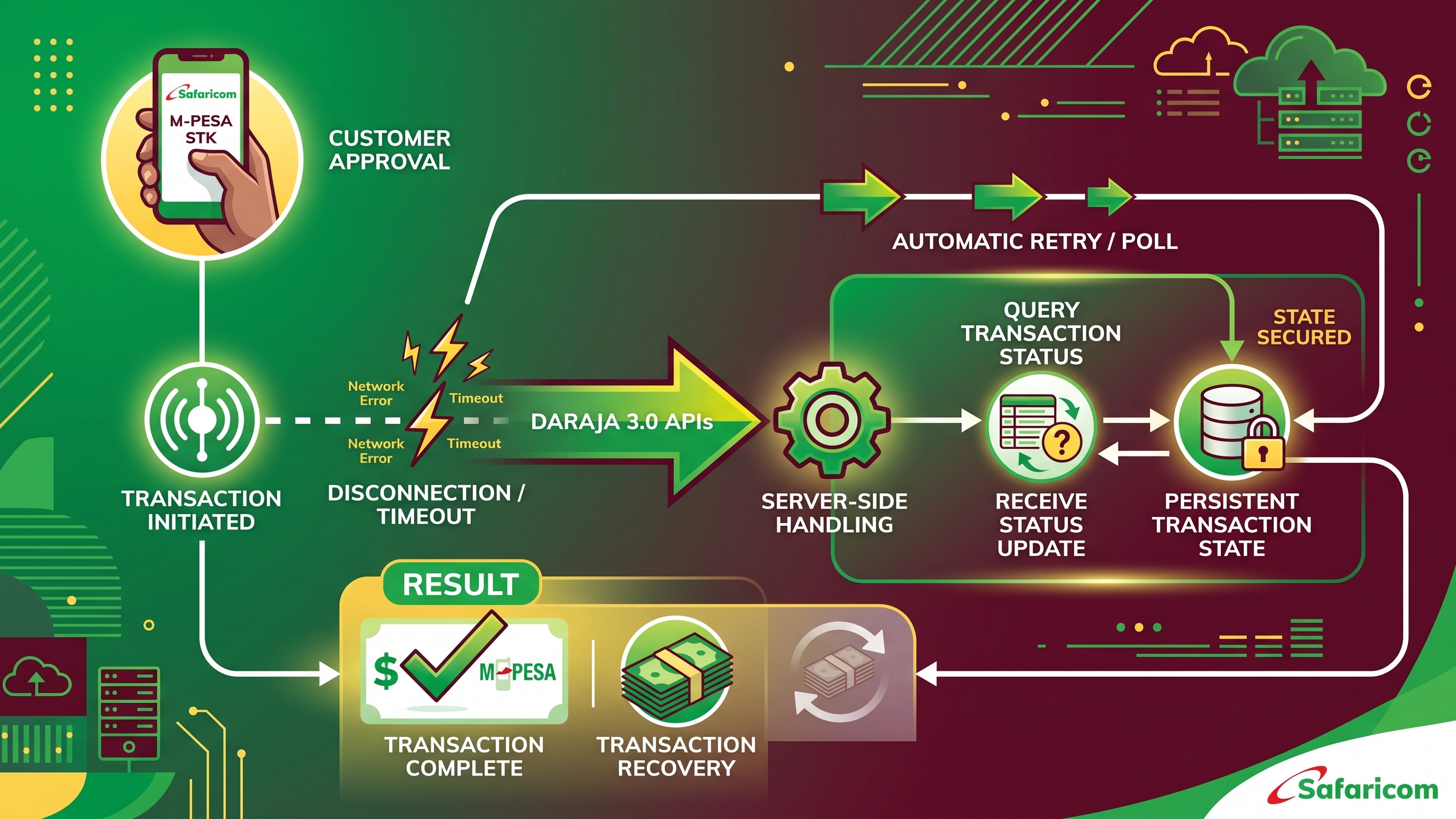
In our previous guide, we walked through a complete Daraja 3.0 STK Push integration from scratch: authentication, initiating the payment prompt, and handling the callback when Safaricom calls back with a result. If you followed that guide, you now have a working integration that handles the happy path well.
But here is the thing: the happy path is not where integrations break down. The happy path is when a customer picks up their phone immediately, enters their PIN within seconds, has full signal, and your server is reachable. That works. The real problems show up in every other scenario.
What happens when a customer enters their PIN but their phone loses signal before the callback reaches your server? What happens when Safaricom's callback takes 45 seconds and your server responds too slowly? What happens when your server was briefly down during a deployment, and the callback hit your endpoint while it was restarting? What happens when a customer panics and tries to pay twice because the first attempt looked like it failed?
These edge cases are not rare. They happen daily in production, and they cause real business problems: orders stuck in "pending" forever, customers getting charged but not receiving their goods, duplicate payments, and support tickets that are hard to resolve without a clear audit trail.
This guide is about fixing all of that. We will cover the complete defense strategy for STK Push reliability: understanding what can actually go wrong, building a state machine that survives network failures, using the STK Query API as your safety net, making your callback handler truly idempotent, and setting up a background reconciliation job that catches anything the real-time flow misses.
All code examples continue from the Node.js project structure we set up in the previous article.
Understanding What Can Actually Go Wrong
Before writing any code, it is worth being precise about the failure modes you are defending against. They are not all the same problem.
Scenario 1: The customer paid but the callback never arrived. The customer entered their PIN, M-Pesa debited their account and credited yours, but your server never received the callback. This happens when your server was temporarily unreachable, when the callback request timed out, or when a brief network hiccup caused the POST to your callback URL to fail entirely. The money moved. Your system just does not know about it.
Scenario 2: The callback arrived but your server crashed before processing it. Your callback endpoint received the POST from Safaricom and responded with a 200, but your server crashed or restarted before the database write completed. The money moved, Safaricom thinks you acknowledged it, but your database is still showing the order as pending.
Scenario 3: The STK prompt timed out. The customer had 60 seconds to enter their PIN and did not respond in time. Safaricom sends a callback with ResultCode 1037. Your system should mark the order as "expired" and offer the customer a retry. If you do not handle this properly, the order just sits in pending.
Scenario 4: The customer cancelled. The customer dismissed the STK prompt. ResultCode 1032 arrives. Same handling requirement as the timeout case.
Scenario 5: The callback arrived twice. Safaricom's documentation and real-world behavior confirm that callbacks can be delivered more than once, especially if your server's initial 200 response was slow or ambiguous. If your callback handler is not idempotent, this results in double-processing: orders marked as paid twice, duplicate fulfilment, or worse.
Scenario 6: The customer's network dropped between PIN entry and callback delivery. The most frustrating edge case. The customer is certain they paid (they saw their phone briefly show "processing"), but the callback has not arrived. The transaction may or may not have completed on M-Pesa's side. You genuinely do not know.
Each of these requires a specific response. The unifying principle across all of them is this: never trust only the callback, and always be able to answer the question "what is the current state of this transaction?" at any point in time.
Step 1: Design Your Transaction State Machine
The foundation of resilient STK Push handling is a well-designed state machine. Every transaction should move through clearly defined states, and your code should only be able to move a transaction forward, never backward, and never skip states.
Here is the state model to implement:
INITIATED means you have sent the STK Push request to Daraja and received a CheckoutRequestID. You have not yet received any callback.
PENDING means the STK prompt has been sent to the customer's phone. This is still essentially the same as INITIATED for most purposes, but it is useful to distinguish between "we sent the request to Daraja" and "Daraja confirmed the prompt reached the customer."
COMPLETED means you received a callback with ResultCode 0 and have confirmed the payment. This is the only terminal success state. You should never move out of this state.
FAILED means you received a callback with a non-zero ResultCode (user cancelled, wrong PIN, insufficient funds, etc.), or you queried the transaction status and got a definitive failure response. This is a terminal failure state.
EXPIRED is a special variant of FAILED for timeout cases (ResultCode 1037) or when your own reconciliation job determines a transaction has been pending too long without resolution. Making this a separate state is useful because an expired transaction may be retried, while a FAILED transaction (wrong PIN, cancelled) typically should not be.
QUERIED is an optional intermediate state you can use to indicate that you have proactively queried this transaction's status via the STK Query API and are awaiting a definitive result.
Here is the database schema to implement this:
The most important fields here are checkout_request_id (your primary key for matching callbacks), status (your state machine), mpesa_receipt_number (the M-Pesa transaction identifier for reconciliation), and raw_callback (your audit trail). Never skip storing the raw callback payload. When something goes wrong at 2am, those logs are the only way to reconstruct what actually happened.
Step 2: Store Transaction State Immediately After Initiating
This is where most developers make their first mistake. They initiate the STK Push, wait for the callback, and only then write anything to the database. The problem with this approach is that if anything goes wrong between initiation and callback, you have no record of the transaction in your system.
The correct approach is to write the transaction record to your database immediately after receiving the STK Push response from Daraja, before the customer has even touched their phone.
Update utils/mpesa.js to return the full Daraja response, and update your /stkpush route:
The CheckoutRequestID is now the foreign key that connects your internal transaction record to everything that comes back from Daraja. Every callback lookup, every query, every reconciliation job, everything goes through this ID.
Step 3: Build an Idempotent Callback Handler
Your callback handler needs to do three things correctly: respond to Safaricom immediately, process the callback exactly once regardless of how many times it is delivered, and handle all ResultCode scenarios explicitly.
Here is a production-ready callback handler:
Two details in this handler are worth emphasising. First, the immediate 200 response before any database work. Safaricom's documented expectation is that your server responds within 30 seconds, but in practice, a slow response increases the likelihood of retries. Respond first, process second. Second, the idempotency check at the start. Before doing anything, confirm that you have not already processed this CheckoutRequestID. This single check prevents an enormous class of bugs.
Step 4: Implement the STK Query API as Your Safety Net
The STK Query API is Daraja's answer to the question: "I initiated an STK Push and never got a callback. What actually happened?" It lets you ask Safaricom directly for the current status of any transaction, identified by CheckoutRequestID.
The endpoint is POST https://sandbox.safaricom.co.ke/mpesa/stkpushquery/v1/query (swap for the production URL when going live). The request body requires the same BusinessShortCode, Password, and Timestamp fields as the STK Push request itself.
Add this to your utils/mpesa.js file:
The query response looks like this for a completed transaction:
And for a transaction that is still being processed (the customer has not responded yet):
That 500.001.1001 error code is important. It is not a real error. It means the transaction is still in flight. When you hit this code, do not mark the transaction as failed. Wait and query again.
Here is a route you can call from your frontend or use in your background job:
Step 5: Add a Frontend Polling Loop
Your frontend should not assume the callback will update the UI automatically. Implement a polling loop that calls your query endpoint at a reasonable interval until it gets a definitive answer. A 3-second interval for a maximum of 20 attempts (about a minute total) is a sensible starting point.
The error message for the client-side timeout deserves particular attention. If the polling loop times out, do not tell the customer their payment failed. You do not know that. Tell them you could not confirm the status, and give them a way to check. Many Kenyan users will have received an M-Pesa confirmation SMS even if your system has not yet caught up. Do not cause a double-payment by telling a customer who already paid that their payment failed.
Step 6: Build a Reconciliation Background Job
The final layer of defense is a background job that periodically sweeps for transactions that are stuck in the INITIATED or PENDING state past a reasonable deadline and queries their status proactively. This catches anything the real-time flow missed.
One important note on the reconciliation job: when you resolve a COMPLETED transaction via query (rather than via callback), you will not have a MpesaReceiptNumber in the query response. The STK Query API confirms the transaction completed but does not return the M-Pesa receipt. You will need to use the Transaction Status API (a separate Daraja endpoint) if you need the receipt number for these edge-case transactions. For most use cases, confirming the payment completed and fulfilling the order is sufficient, and the customer's SMS confirmation from Safaricom serves as their receipt.
Putting It All Together: The Full Defense Strategy
To summarise the complete approach:
At initiation: Write the transaction to your database with status INITIATED immediately after receiving the CheckoutRequestID from Daraja. Never wait for the callback before creating a record.
Callback handling: Respond with HTTP 200 before processing. Always check idempotency before updating. Store the raw callback payload. Handle ResultCode 0 (success), 1032 (cancelled), 1037 (timeout), and all other non-zero codes explicitly.
Client-side: Poll the query endpoint every 3 seconds for up to a minute. Do not tell customers their payment failed unless you have a definitive failure ResultCode. For timeouts, instruct customers to check their M-Pesa messages before retrying.
Background job: Sweep for INITIATED or PENDING transactions older than 10 minutes and query their status. Run every 5 minutes. Log everything.
Database: Keep the raw_callback and raw_query_response fields. They are your lifeline when disputes arise.
A Note on Double Payments
The most common real-world fallout from missing the above safeguards is not failed orders, it is double payments. A customer pays, your system does not update, the customer tries again, and both payments go through. Now you have charged them twice.
The defence is straightforward: before initiating a new STK Push for an order, check if there is already a COMPLETED transaction for that order in your database. If there is, do not initiate again. If there is a PENDING transaction less than 2 minutes old, do not initiate again either as the first attempt may still be in flight. This single check prevents the vast majority of double-payment incidents.
Building this kind of resilience into your M-Pesa integration is not optional for production applications. In Kenya's network environment, where connectivity can be inconsistent and Safaricom's own systems occasionally have latency spikes, treating the callback as unreliable is the only way to design your payment flow. The callback is the primary path. The query API and reconciliation job are your fallbacks. Together, they make sure you never permanently lose a transaction.
Have questions about production edge cases or a specific failure mode you have encountered? Drop a comment below or reach us at [email protected]. We are working on the next part of this series, which will cover securing your callback endpoint against spoofed requests and implementing IP allowlisting.
Comments