 By
By 
If you are a Kenyan or African developer building on Cloudflare R2, there is a feature that quietly launched in open beta earlier this month that you should enable on your buckets right now. It is called Local Uploads, it costs nothing extra, and depending on where your users are relative to your bucket, it could cut your upload latency by up to 75%.
That is not a marketing number. It is from Cloudflare's own synthetic benchmarks, and the underlying reason it matters so much for African developers specifically is worth understanding.
The Problem: Your Bucket Is Far Away
When you create an R2 bucket, it lives in a specific region — typically somewhere in the US or Europe, because those are where the primary storage locations are. Your Cloudflare Workers run at the edge, close to your users, which is why reads are already fast globally. R2 automatically caches reads across Cloudflare's network.
But writes have always been a different story.
When a user in Nairobi uploads a file to your app — a profile picture, a document, a video clip — that data has to travel all the way from their device to your bucket's physical location. If your bucket is in Eastern Europe, you are looking at a round trip that crosses oceans and multiple network hops. The result is slow, variable, and sometimes unreliable upload performance.
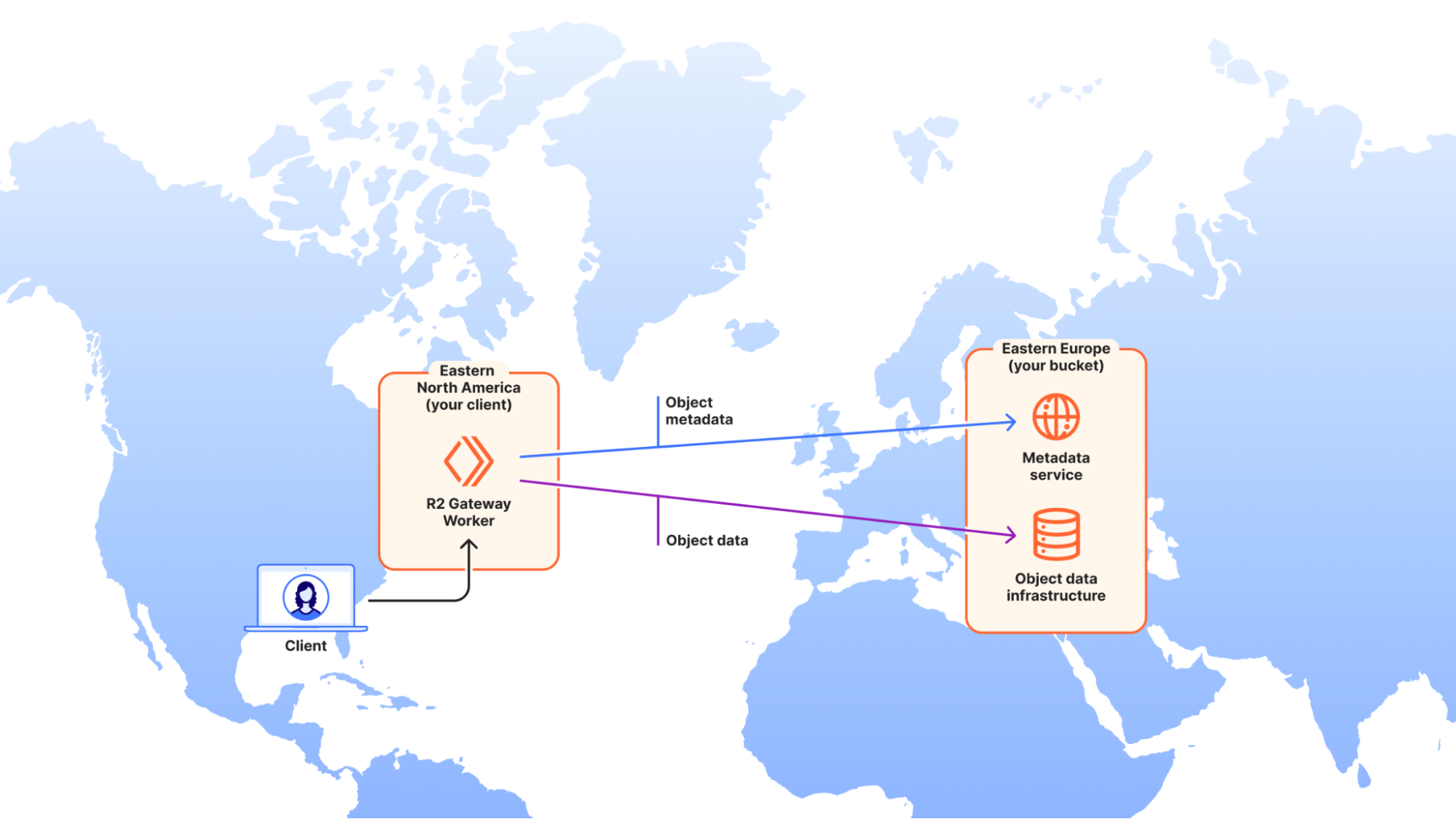
This is the "distance problem," and it has been the one area where R2's promise of global performance broke down. Until now.
What Local Uploads Does
Cloudflare's Local Uploads feature changes how R2 handles write requests when the client is in a different region from the bucket.
Here is what happens with Local Uploads enabled:
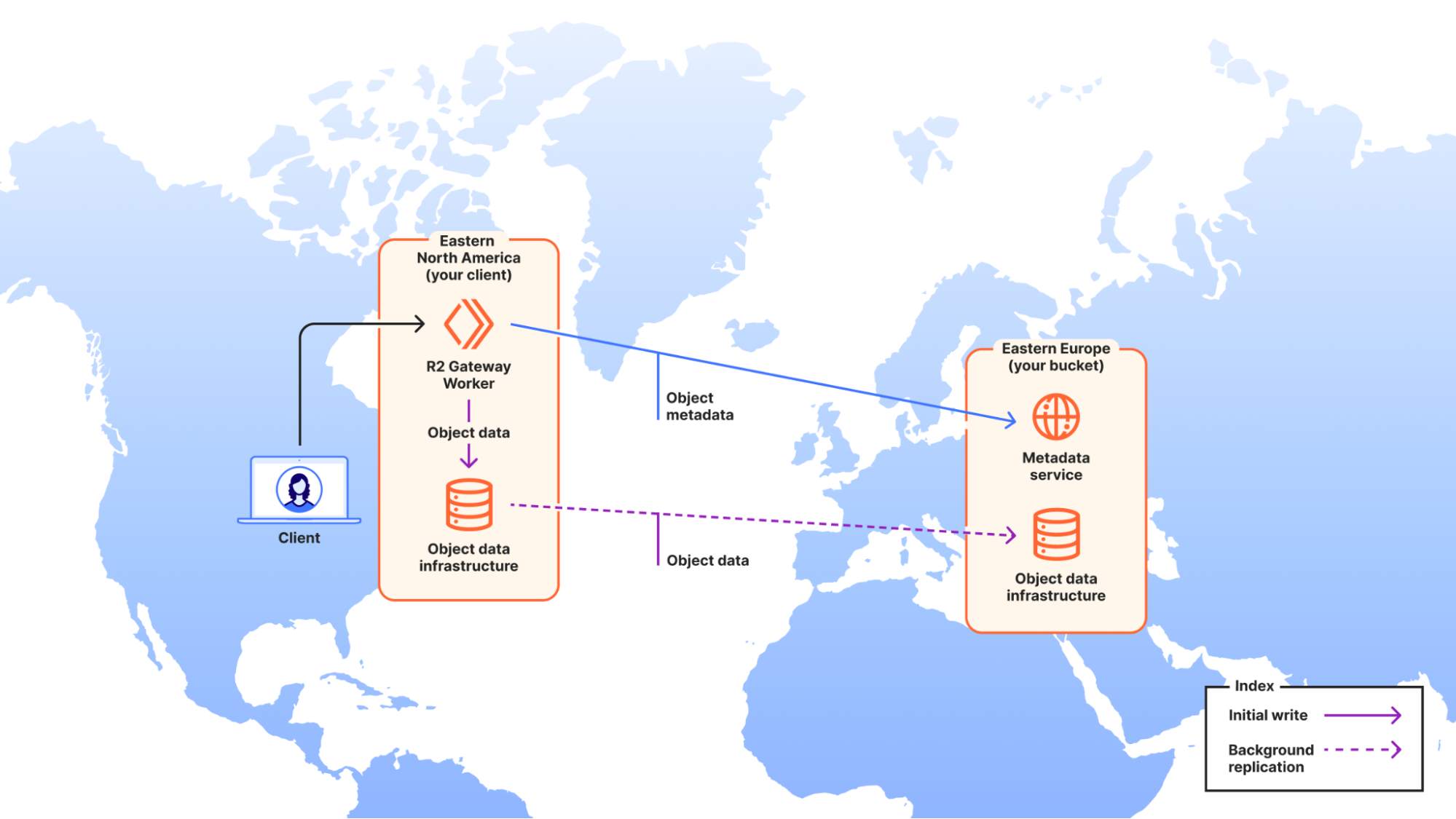
1. Your user in Nairobi initiates an upload.
2. R2 receives the request at the nearest Cloudflare point of presence — in this case, likely the Nairobi or Mombasa data centre.
3. The object data is written to storage infrastructure close to the user immediately.
4. R2 returns a success response to the client right away. The upload is done from the user's perspective.
5. In the background, Cloudflare replicates the data to your bucket's home region asynchronously.
The critical detail is step 4. The object is immediately accessible and strongly consistent the moment the upload completes — there is no waiting for replication to finish before the file can be read. Cloudflare handles the background copying with automatic retries to ensure nothing is lost.
In Cloudflare's own benchmark tests — simulating a client in Western North America uploading to a bucket with an Asia-Pacific location hint — median upload time dropped from around 2 seconds to around 500 milliseconds after enabling Local Uploads. That is a 75% reduction in Time to Last Byte.
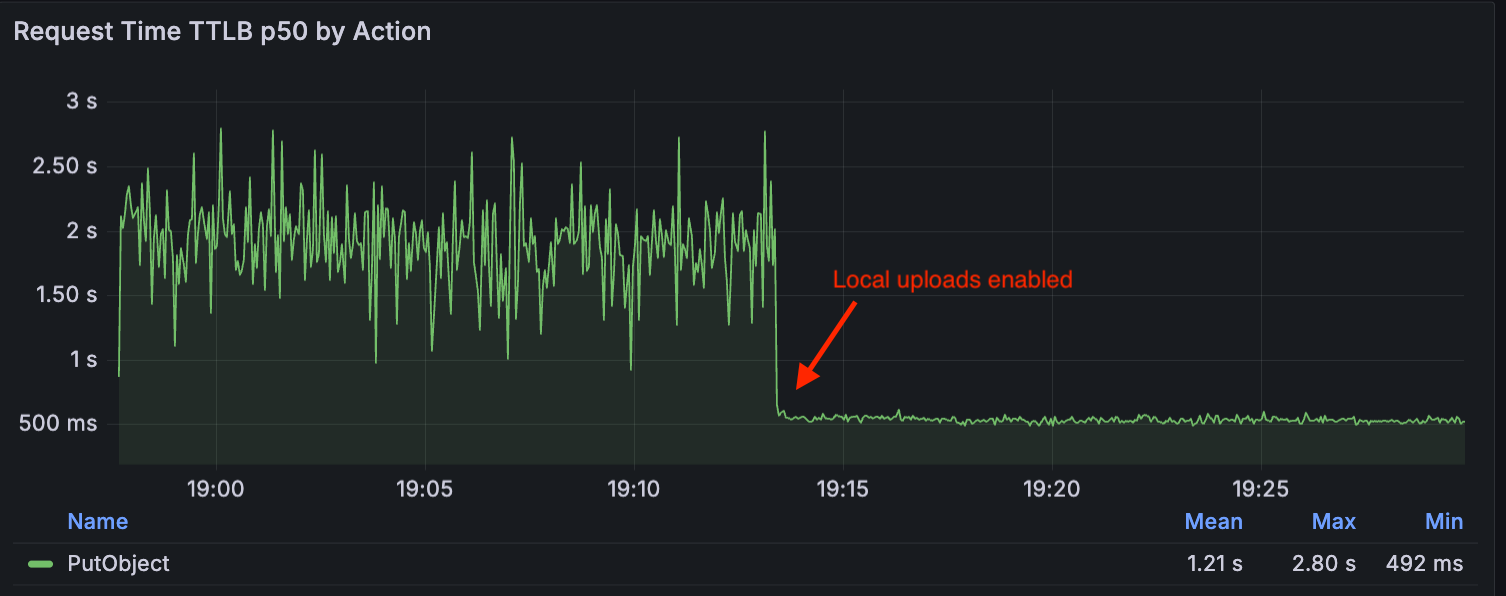
For a user in Nairobi uploading to a US-based bucket, the distance and latency profile is even more extreme than that benchmark scenario. The gains are likely to be at least as significant, and possibly more.
Why This Matters More for Africa Than Almost Anywhere Else
Cloudflare has over 300 points of presence globally, including multiple locations across Africa — Nairobi, Lagos, Johannesburg, Cairo, and others. This means the "nearest PoP" for your Kenyan users is genuinely nearby, not a European proxy.
But the primary R2 storage regions are concentrated in North America, Europe, and Asia-Pacific. There is no R2 storage region in Africa. This means every single upload from an African user to an R2 bucket — without Local Uploads — has been making a cross-continental journey.
That gap matters in practical terms. If you are building:
A file sharing or document management app with Kenyan users
A media platform where users upload photos or videos
A mobile app that syncs data or logs to R2
An e-commerce platform where sellers upload product images
...every upload your users make has been traveling thousands of kilometres more than it needed to. Local Uploads eliminates that penalty.
One Thing to Know Before You Enable It
Local Uploads works best when your reads and writes come from the same region. There is a nuance worth understanding: when a file is uploaded locally and replication to the home bucket region is still in progress, a read request coming from near the bucket's home region — not from near the uploader — may experience some latency until replication completes.
In practice, for most Kenyan and African developer use cases, this is not a concern. If your users are uploading and reading their own content from the same general region, the experience is fast in both directions. The edge case to watch is if you have a backend process in the US reading files immediately after an African user uploads them — there could be a brief window before replication completes.
Also worth noting: Local Uploads is not available for buckets with jurisdictional restrictions enabled, such as EU-restricted or FedRAMP buckets, because the feature requires temporarily routing data through locations outside the bucket's designated region.
How to Enable It
Enabling Local Uploads takes about 30 seconds and requires no code changes. It works with the S3 API, Workers Bindings, and plain HTTP — whatever you are already using continues to work exactly as before, just faster.
Via the Cloudflare Dashboard:
1. Log in to the Cloudflare dashboard.
2. Navigate to R2 Overview.
3. Select the bucket you want to update.
4. Go to the Settings tab.
5. Find Local Uploads and select Enable.
That is it. Existing uploads complete normally with no interruption to traffic.
Via Wrangler (CLI):
If you prefer the command line, a single command does the job:
Replace `[YOUR_BUCKET_NAME]` with the name of your bucket. You can also disable it at any time with:
Cost: There is no additional cost. Upload requests incur the standard Class A operation costs, exactly as they did before Local Uploads.
How to Verify It Is Working
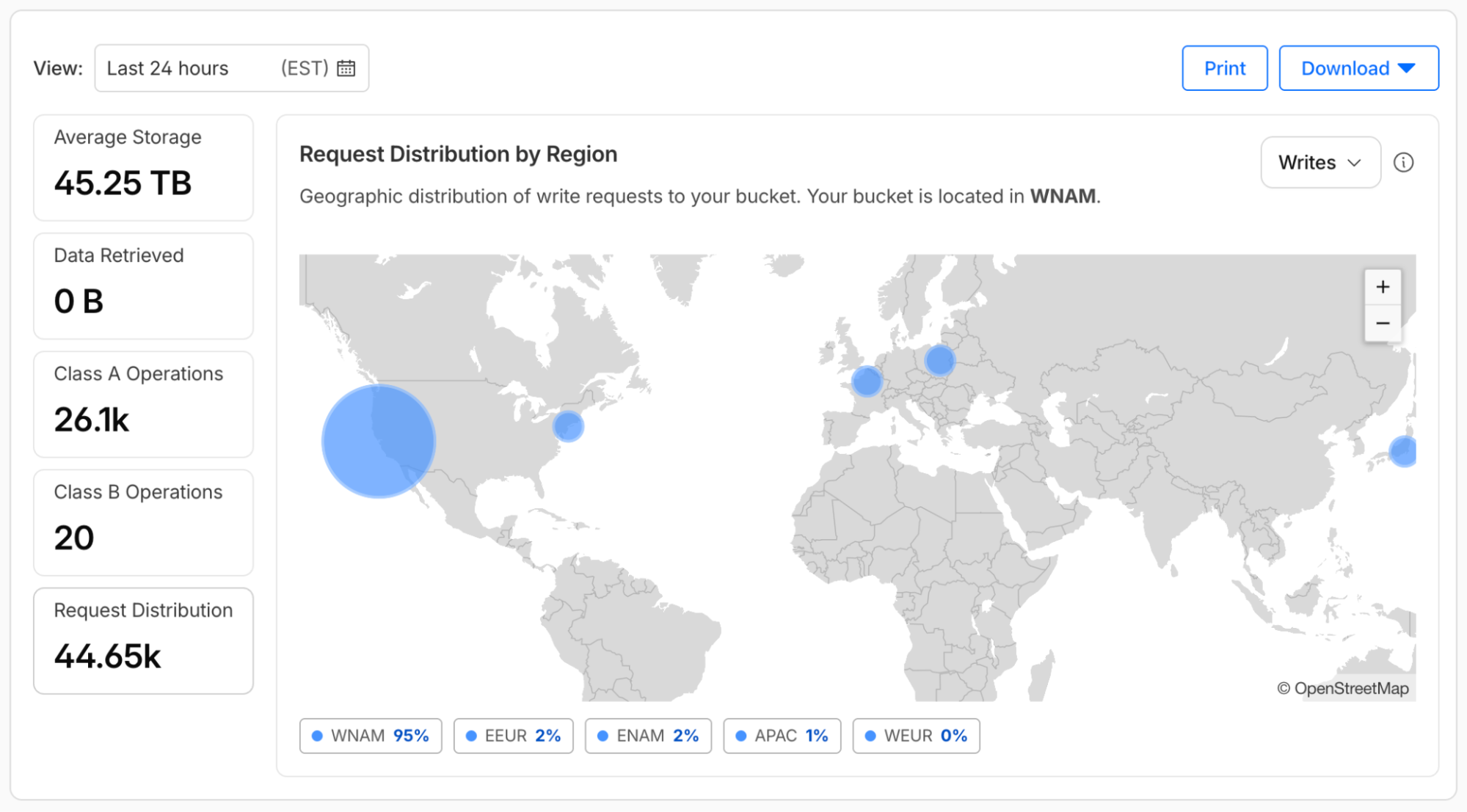
Once enabled, you can monitor the impact through the R2 bucket metrics page in the Cloudflare dashboard. Navigate to your bucket, select Metrics, and look at the Request Distribution by Region chart. This shows you the geographic distribution of read and write requests and gives you a picture of where your traffic is coming from relative to your bucket location.
If you want to test it directly, Cloudflare has a public demo at `local-uploads.r2-demo.workers.dev` that lets you simulate uploads from different geographic locations and see the latency difference with and without Local Uploads enabled.
How Does This Compare to AWS S3 Transfer Acceleration?
AWS offers a similar feature for S3 called Transfer Acceleration, which uses CloudFront edge locations to speed up uploads from distant clients. The approaches are architecturally different: S3 Transfer Acceleration optimises routing through the AWS network backbone, while R2 Local Uploads performs actual local writes with asynchronous replication.
The practical difference for Kenyan developers is cost. S3 Transfer Acceleration carries an additional per-GB charge on top of standard S3 pricing. R2 Local Uploads is free, and R2 already has no egress fees — which is the reason many developers in Kenya and across Africa have been moving away from S3 to R2 in the first place.
Google Cloud Storage and Azure Blob Storage currently have no equivalent feature that accepts local writes globally.
The Bigger Picture
This is the second significant developer-focused update from Cloudflare in recent weeks that has direct implications for African developers. We covered Cloudflare's Markdown endpoint for AI agents this month — a feature that changes how AI systems consume web content, with meaningful implications for publishers on the continent.
Local Uploads is a more targeted, infrastructure-level improvement, but it addresses one of the most persistent friction points for developers building user-facing applications in markets far from where cloud storage infrastructure is concentrated. The fact that it costs nothing to enable makes the decision simple.
If you are building on R2, turn it on today.
Are you building on Cloudflare R2? Share what you are working on in the comments — we are always looking to feature interesting projects from Kenyan and African developers.
Comments